Create a Symbol Key
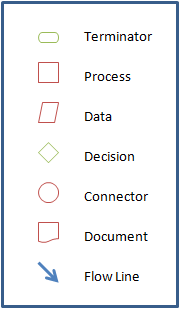
A flowchart symbol key lets people viewing your flowchart decipher the meanings behind the symbols. As the sample image below shows, a symbol key will show the symbol graphic and symbol name. The symbol names can be edited by changing the Name field in the Symbol List grid on the Settings form. To generate a flowchart symbol key, click Symbol Key on the FlowBreeze toolbar. You will be prompted to select a location on the worksheet to place the symbol key. When you click OK the symbol key is generated with styles applied.
Note: The symbol key is Grouped. If you need to edit the contents of the symbol key, see how to Work with Grouped Symbols.