Resizing Symbols
Resizing of shapes is often needed if the text is too long to fit within a given size. FlowBreeze will auto-size shapes when they are created, but there are times when text needs to be edited. If the new text is longer, this can lead to an undersized flowchart shape. Also, resizing is often a good idea to keep all the shapes in a row or column a uniform size. Not only does this look nicer, but it improves clarity and readability as well.
Steps
- Click on the flowchart symbol with your mouse to select it.
- The symbol's sides and corners will display little circles called "handles".
- Position your mouse over one of the handles until the mouse cursor changes to little double arrows.
- Click on the handle and, while holding the left mouse button down, drag the edge of the symbol until you get the size you want.
Tips
- Turn on Snap to Grid to ensure the symbols remain aligned to the grid.
- While you are re-sizing a symbol, the outline of the new size is shown in dashed lines as shown below.
- Dragging a corner handle allows you to resize the height and width simultaneously.
- Sizing symbol heights and widths to an even number grid units ensures that flow lines run straight.
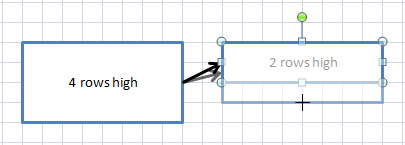
Symbol resizing