Snapping Shapes
"Snap" is a term that means shapes are aligned, moved, or re-sized in uniform intervals or positions. In Excel, there are two types of snapping available: Snap to Grid and Snap to Shape. FlowBreeze activates both types of snap automatically a flowcharting session is started. But if you ever close a workbook and re-open it, you will be to turn them back on manually if you want to edit the flowchart.
Snap to Grid
Snaps the symbols to the nearest worksheet cell gridline when positioning or sizing symbols. The Snap to Grid button is located on the main FlowBreeze ribbon tab.
Snap to Shape
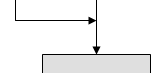
Snaps the symbols to the nearest shape. It is activated by clicking Grid > Snap to Shape. A common usage for this is to route flow lines up to other flow lines, as show below.