Spreadspeed –
Excel® Utilities and Auditing Tools
Improve Your Productivity with Excel and Reduce Spreadsheet Errors
Spreadspeed is an add-in for Microsoft Excel® that helps you get more done in less time. Spreadspeed contains utilities to perform common tasks on Excel objects - workbooks, worksheets, ranges, tables, and shapes - as well as perform common operations on text, numbers, dates, styles, and data. Spreadspeed also has auditing tools that reduce your risk by helping you identify and prevent errors and improve the overall quality of your spreadsheets.

Spreadspeed Ribbon Tab
Spreadspeed Productivity Features
The following sections give a listing of each of the features by Excel object type. For more information on any section, click the header link to go to the related page with in-depth details.
Workbook Explorer …
When you're working with multiple workbooks or workbooks with many sheets, the Spreadspeed Xplorer makes it easy to find and activate the item that you need. For each open workbook, and it lists all the worksheets, charts, tables, and named ranges contained in the workbook. With Xplorer, you can jump to any listed item in a just a few clicks.
Xplorer opens in a floating dialog, which means that you can use Excel as normal while Xplorer is open (or minimized to the taskbar). Simply activate Xplorer and refresh the listings as needed for fast access to any worksheet, chart, or range.
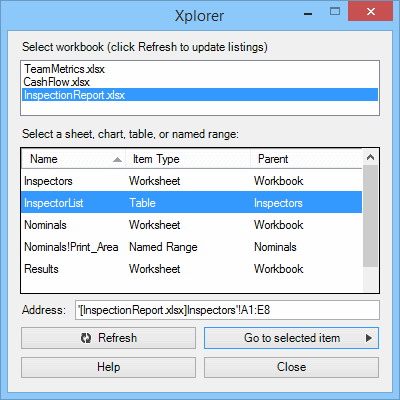
Xplorer
Favorites & Formulas Manager …
With the Spreadspeed Favorites tool, you can find and open Excel files in a snap. For each favorite, you can even indicate the sheet or range to activate. If you have trouble remembering the name of that spreadsheet you created months ago, Spreadspeed Favorites can help by enabling you to organize files into named groups for projects and tasks.
You can also store Favorite Formulas. After creating a complex function that has been tested and debugged, the last thing you want to do is have to re-create it later - or hunt down the file that it was created in and copy it. With the Favorite Formulas tool, you can save the formula with a user-friendly name and full description for easy re-use later.
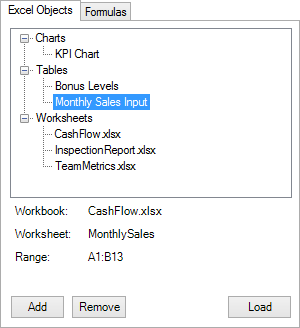
Favorite Excel Objects
Workbook Utilities …
The workbook utilities include the following features:
- Create Table of Contents: List all the worksheets, charts, tables, and named ranges in the current workbook.
- Sort Worksheet Tabs: Quickly sort tabs by name, color type, or a customized order.
- Add Multiple Worksheets: Create or import a list of worksheets name (and colors) to generate new tabs.
- Remove Empty Worksheets: Remove worksheets with no content from the current workbook.
- Hide / Unhide Sheets: Toggle the visibility of multiple worksheets.
- Save Worksheets to Separate Files: Split selected sheets out to separate Excel files.
- Close and Re-Open Last Save: Close the current workbook and re-open it from the last save point.
- Save a Backup Copy of Workbook: Save a time stamped backup copy of the current workbook.
- Quick Protect: Unlock cells based on Styles then protect either the current worksheet or the entire workbook.
- Quick Unprotect: Unprotect current worksheet or entire workbook.
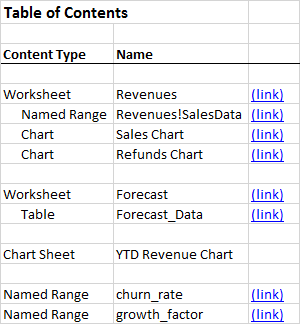
Sample Workbook Feature:
Table of Contents
Worksheet Utilities …
The worksheet tools include the following features:
- Delete Blank Rows in Worksheet: Deletes all the rows containing no content in the used range of the current worksheet.
- Delete Blank Rows in Selected Range: Deletes all the rows containing no content in the selected range.
- Delete Blank Columns in Worksheet: Deletes all the columns containing no content in the used range of the current worksheet.
- Delete Blank Columns in Selected Range: Deletes all the rows containing no content in the selected range.
- Autofit Rows and Columns: Advanced options for sizing rows and columns.
- Reset UsedRange: Resets UsedRange and clears formatting and empty strings beyond last cell.
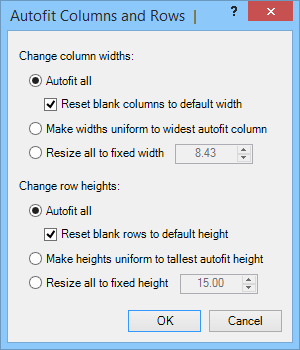
Sample Worksheet Feature:
Advanced Autofit
Range Utilities …
The Spreadspeed range-related features include the following items:
- Split Single Column into Multiple Columns: Split a data series into an array of columns and rows based on a set of criteria.
- Split Single Row into Multiple Rows: Split a row data series into an array of rows and columns based on user-specified criteria.
- Concatenate Rows / Columns: Join the contents of multiple rows / columns into a single row / column (w/ optional delimiter).
- Transpose in Place: Transposes the rows and columns of the selected range in place without having to Copy > Paste Special > Transpose into a new range.
- Swap Ranges: Swaps the contents of two equal sized ranges.
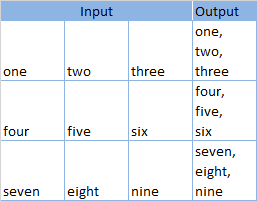
Sample Range Feature:
Concatenate Columns Sample
Table Query Tools …
The table tools let you perform basic queries on spreadsheets. Unlike other tools, including Microsoft Query, you can perform the operations from within the same workbook, and, except for special cases, the ranges do not have to be defined named ranges, formatted tables, or even have headers. The Table Tools include the following query types:
- Join Tables
- Merge Tables (Update and Append)
- Find Unmatched Rows
- Extract Filtered Data from Table
- Extract Columns from Table
- Extract Duplicate Data from Table
- Remove Hidden Rows from Table
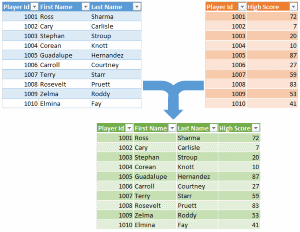
Sample Table Tool:
Join Columns from Two Tables
Shape Utilities …
The following is a list of the Excel autoshape utilities:
- Select Shapes by Type: Select the shapes on a worksheet, filtering by shape type.
- Extract Text from Shapes: Extracts the text from autoshapes to a location on the worksheet - with the additional option of linking the shape text to the worksheet cell contents.
- Group All Shapes: Groups all the shapes on a worksheet into a single shape.
- Ungroup All Shapes: Ungroups all shapes - and nested groups of shapes - on a worksheet.
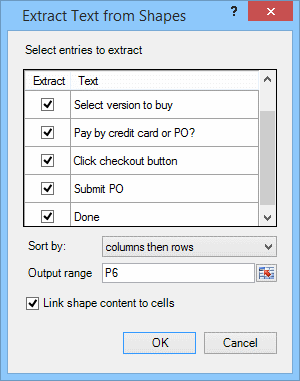
Sample Shapes Feature:
Extract Shape Text and Link to Cells
Formatting Tools …
The style and format operations include these features:
- Reset All Cell Styles: Deletes all the custom cell styles from the current workbook.
- Delete Unused Custom Cell Styles: Delete unused cell styles from the current workbook.
- Selectively Clear Formats: Clears border, fill, font, number format, or text alignment from the user-specified range.
- Clear Excess Formatting: Clears cell formatting in rows and columns that extend beyond the used range of the worksheet.
- Convert Merged Cells to Center-Across-Selection: Un-merges cells in the selected range and formats horizontal alignment as Centered-Across-Selection.
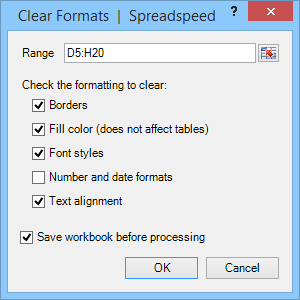
Selectively Clear Formats
Operations
Spreadspeed includes a set of timesaving tools to work with the major content types in Excel - text, numbers, and dates. It also has a number of handy operations for working with data, exporting worksheet content, and managing cell styles.
Text Operations …
Spreadspeed includes the following text operations:
- Advanced Trim Tool: Perform trim operations by fixed position, delimiters, or special characters.
- Trim Selection: Several methods of directly trimming leading and trailing whitespace, plus double spaces.
- Add Prefix / Suffix to Text: Add characters to the beginning or end of text.
- Change Case Tool: Allows you to specify the range and change case type.
- Change case on selection: Change the case of the selected range to upper, lower, sentence, or title case.
- Name case: Change the capitalization of a list of people's names.
- Clean Text: Removes non-printable characters from text.
- Clear Empty Strings: Clears contents in cells with empty strings that are treated as non-blank by Excel.
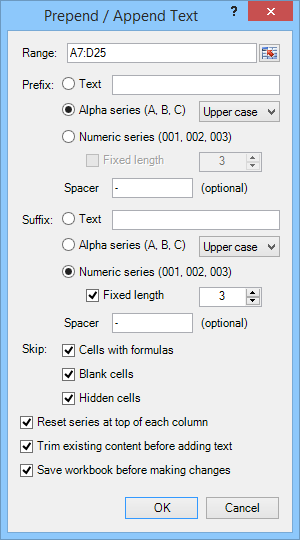
Add Text Prefixes and Suffixes
Data Tools …
The data operations features include the following:
- Subtotals: Extract the subtotals from a range (without the grouping of the built-in Excel Subtotal tool).
- Sum and Percentages: Calculates the sum for a range and generates a percentage and (optional) cumulative percentage column.
- Descriptive Statistics: Generates the descriptive statistics for a range.
- Remove Repeated Data: Removes repeating data in a column or row, leaving only the first item.
- Fill Repeating Data: Fills gaps in a column or row with repeating data.
- Perform Random Sort: Perform randomized sorting on a range.
- Create Dropdown Validation List: Create a dropdown validation list from an existing range of values.
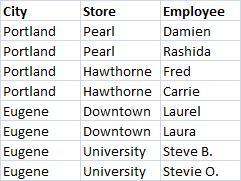
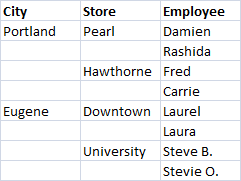
Fill / Remove Repeating Data
Export Tools …
The export features include the following:
- Save Chart to Image File: Exports a user-specified chart to an image file.
- Save Range to Image File: Exports a user-specified range to an image file.
- Save Shapes to Image File: Exports a user-specified range of shapes to an image file.
- Save Range to Text File (csv, txt): Saves a user-specified range to a comma separated (csv) or tab delimited (txt) file.
- Unordered List: Creates an HTML unordered list (ul) from a user-specified range.
- Ordered List: Creates an HTML ordered list (ol) from a user-specified range.
- HTML Table: Creates an HTML table from a user-specified range.
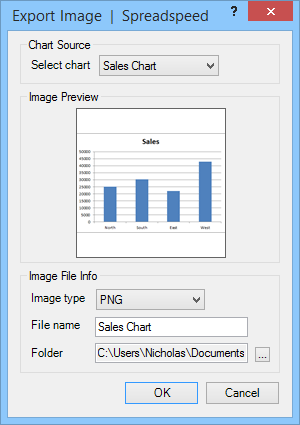
Export Chart to Image File
Numeric Operations …
Spreadspeed features the following numeric operations:
- Fill Range with Random Numbers: Fills a range with random numbers from a uniform or normal distribution.
- Math Operations in Place: Perform numeric (math) operations in place on selected range.
- Negate Selected Values: Inverts the sign of selected values.
- Convert Text to Numbers: Converts numbers stored as text into their numeric values.
- Convert Formulas to Values: Convert formulas to values in the selected range.
- Round to 0 decimal places: Rounds and sets number format to 0 decimal places.
- Round to 2 decimal places: Rounds and sets number format to 2 decimal places.
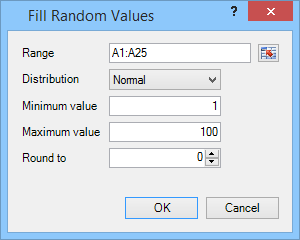
Fill Range w/ Random Values
Date Operations …
The Spreadspeed date operations include:
- Fill Range with Random Dates: Fill range with random dates from a uniform or normal distribution.
- Convert Text to Date Format: Convert dates stored as text into Excel date values.
- Change All Date Formats: Converts all the dates on a worksheet to the user specified date format.
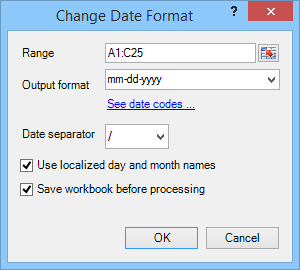
Change All Date Formats
Spreadsheet Auditing Features
Spreadspeed includes a set of auditing, error detection, and risk reduction tools to help professionals save time, reduce errors, and prevent loss. Excel has made the news headlines in the last few years, and it hasn't been good news. The "London Whale" trading fiasco cost JP Morgan over 2 billion dollars. The Reinhart-Rogoff modeling error caused international embarrassment for a widely referenced economic theory. Beyond the high profiles cases, spreadsheet errors have long been the subject of scrutiny by the European Spreadsheet Risk Interest Group (EuSpRiG), Sarbannes-Oxley auditors, academics, and professionals who rely on Excel to manage their businesses and information. Spreadspeed auditing tools were created to help you follow known best practices in spreadsheet design.
Formula Dependency Navigator …
The Dependency Navigator will let you display and navigate the precedents and dependents in the active worksheet. The built-in tools for tracing formulas require you to hunt around for the formulas and click through for every cell to trace. With the Spreadspeed Dependency Navigator, you can see the full formula trace stack for the entire workbook, from both a dependents view and a precedents view. It identifies all the cells with formulas and creates a treeview of the formula calls, allowing you to easily browse through and identify possible quality issues.
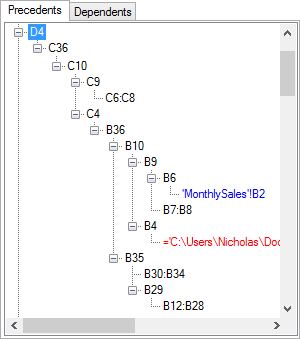
Formula Precedents Navigator
Compare Worksheets …
The Compare Worksheets tool will analyze the content of two worksheets. It treats the first sheet as a baseline and the second as an audit sheet. It highlights the differences in formulas, values, number formats, date formats, and cell styles. The Compare Worksheets tool splits the screen to let you see a visual map of the differences, and offers a Compare Navigator dialog to browse through the altered cells. It also has a bi-directional copy tool, to update the differences from one sheet to the other – either cell-by-cell or for the entire sheet.
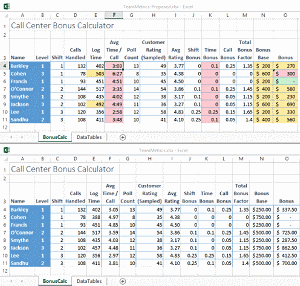
Compare Worksheets Sample
Visual Audit (Content Map) …
The Visual Audit tool creates a color-coded content map of your worksheet, highlighting each cell by content type:
- Formulas
- Inputs
- Constants ((plain text, numbers, and dates)
Additionally, it will mark cells with:
- Errors
- Unlocked formula cells
- Formulas with external or off-sheet links
- Locked input cells
- (Optionally) add cell comments describing each error type
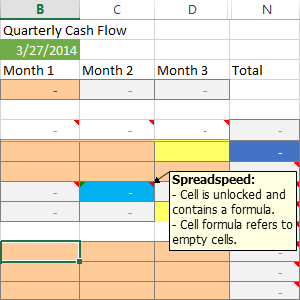
Visual Audit w/ Error Comments
Formula Tools …
Spreadspeed offers three ways to scan your spreadsheets for inconsistent formulas:
- Find Inconsistent Formulas in Columns: Find inconsistent formulas in a user-specified column.
- Find Inconsistent Formulas in Rows: Find inconsistent formulas in a user-specified row.
- Flag Inconsistent Formulas in Worksheet: Scans entire worksheet and identifies anomalies in formula consistency patterns.
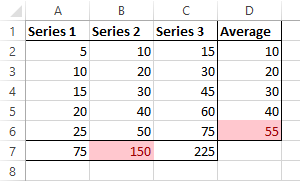
Find Inconsistent Formulas Example
Audit Reports …
The Spreadspeed auditing reports will scan your workbook and identify a wide range of possible issues:
- Worksheet Comparison Report: Create a listing of all the differences between two worksheets.
- Generate Master Report: Create a comprehensive report of potential spreadsheet problems.
- Formulas Report: Generate a report of all the unique R1C1 formulas in the workbook.
- Cell Errors Report: Create a listing of all cells with Excel error flags.
- Circular References Report: Create a listing of all circular references in a workbook.
- External Formula References Report: Create a listing of all cells with formulas containing external references (off-sheet and off-book).
- Comments Report: Create a listing of all the comments in a workbook.
- Hyperlinks Report: Create a listing of all the hyperlinks in a workbook.
- Named Ranges Report: Create a listing of all the named ranges in a workbook.
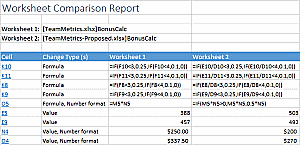
Audit Reports
Hyperlink Tools …
The hyperlinks features include the following:
- Hyperlinks Navigator: The Hyperlinks task pane allows you to see all the hyperlinks in the current workbook.
- Remove Hyperlinks in Current Worksheet: Removes all the hyperlinks in the current worksheet and converts them to plain text.
- Remove Hyperlinks in Selected Range: Removes all the hyperlinks in the selected range and converts them to plain text.
- Convert Hyperlink() Formulas to Standard Hyperlinks: Converts legacy HYPERLINK() formulas into standard hyperlinks.
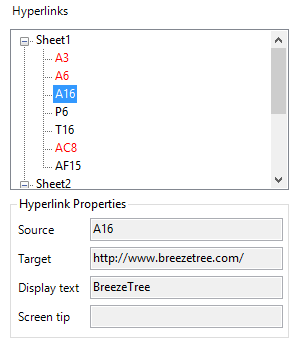
Hyperlinks Navigator
Comment Tools …
The comment features include the following:
- Delete All Comments in Workbook: Deletes all the comments on the current workbook.
- Delete All Comments in Current Worksheet: Deletes all the comments on the current worksheet.
- Remove User Name from Comments: Prompts to remove user name from all comments.
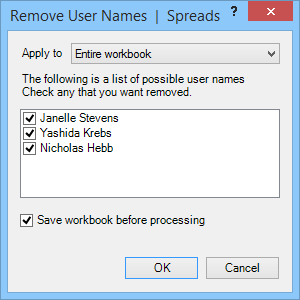
Remove User Names from Comments
About the Spreadspeed Ribbon
The Spreadspeed ribbon consists of many drop down menus organized around the Excel objects that they operate on, e.g., workbooks, worksheets, ranges, tables, and shapes - identified by the top level menu items. Many software products try to encapsulate the meaning of a function within a little 16x16 pixel icon, but with Spreadspeed, the dropdown menu icons identify the target Excel object:
-
 - The feature applies to the whole workbook.
-
 - The feature applies to the current worksheet.
-
 - The feature applies to the selected range.
-
 - The feature applies to tables or named ranges.
-
 - A dialog (form) opens, allowing you to select a range if applicable.
-
 - The feature is run from a task pane (side panel).