FlowBreeze and Spreadspeed Downloads
User-Level Setup (recommended for most users)
Our default setup files require only user-level permissions. If you experience any issues with the installation, most likely you will need to use an admin-level setup file, available in the next section below.
| Product | Downloads (30-Day Free Trial) | Version | System Requirements | |
|---|---|---|---|---|
| FlowBreeze 5 | FlowBreeze Setup | Zipped Setup | 5.3.615 |
|
| Spreadspeed 3 | Spreadspeed Setup | Zipped Setup | 3.0.704 | |
Admin-Level Setup
Some organizations have tighter security restrictions which may block our default user-level setups. If you have installed FlowBreeze or Spreadspeed and experienced any installation or loading problems, the admin-level setups below have resolved most of the issues reported to our support. If you do not have administrative privileges on your system, you will need to have your IT department assist with the setup.
| Product | Admin-Level Setup | Version | System Requirements | |
|---|---|---|---|---|
| FlowBreeze 5 | FlowBreeze Admin Setup | FlowBreeze Zipped Setup | 5.3.615 |
|
| Spreadspeed 3 | Spreadspeed Admin Setup | Spreadspeed Zipped Setup | 3.0.704 | |
Installation Instructions
Windows Smart Screen Warning
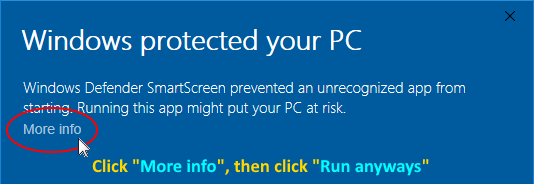
Windows may display a scary looking alert when installing an unfamiliar software package. FlowBreeze and Spreadspeed are widely distributed, but when we release a new version, we change the name of the setup file and Microsoft's familiarity counter resets. If you see the message below, click "More info" then "Run anyways".
Single-User Installation
After you download the setup file, please follow these steps to install and register FlowBreeze and Spreadspeed. The trial downloads are the full version. When you order a license, you will receive a confirmation email containing a license key that unlocks any trial limitations.
- Save the setup file to a convenient location.
- Close Excel if it is running.
- If you have turned off User Account Control (UAC), re-enable it in the Windows Control Panel before running the installer.
- Double-click the setup file to start the installation. If you downloaded the zipped version, run the setup file ending in ".exe".
- When Excel starts, if you are prompted to install the VSTO file, click the Install button to complete the setup.
Site-Wide Installation and Deployment
Site deployment: Our customers use a variety of tools for site deployment (GPO, SCCM, SCE, custom scripts, etc.), and unfortunately we cannot provide detailed technical support for each. However, we use a toolset from Add-in Express that handles the registration and loading of the add-in, and they have provided a useful set of instructions for deploying add-ins via Group Policy that many administrators have found useful: How to install a COM add-in using Windows Server Group Policy.
License key deployment: The license key can be placed in a text file, named either "FlowBreeze5.lic" for FlowBreeze deployments or "Spreadspeed3.lic" for Spreadspeed deployments. This file can be deployed to the installation folder or to the user's Documents folder.
MSI files: If you need direct access to the MSI file for mass deployment, you can download the zipped version, which contains both an EXE bootstrapper and the MSI.
User Account Control (UAC): If the user has turned off UAC, re-enable it in the Windows Control Panel before running the installer.
Opening FlowBreeze and / or Spreadspeed
Because our products are Microsoft Excel add-ins, there is no Start menu item to directly open them. Instead, you will need to open Excel in order to access them.
Message Bar: Enable Content
If you see message "Some active content has been disabled", it's because you have the "Require Application Add-ins to be signed by Trusted Publisher" option checked under Options > Trust Center > Trust Center Settings (by default, Excel has this option unchecked). You'll need to manually enable the add-in by following the steps below. Our software is digitally signed for security, and these steps will register our digital certificate on your system.
- Click the underlined text "Some active content has been disabled. Click for more details.". (Clicking the "Enable Content" button only enables the add-in for the current session.)

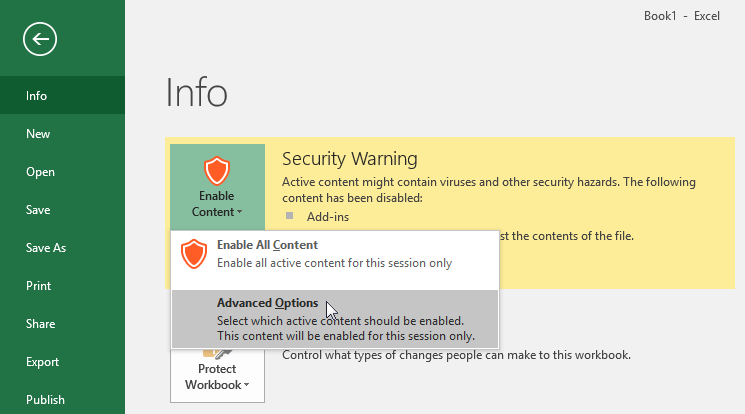
- Clicking the above will open the Info screen. Click the "Enable Content" dropdown button and select "Advanced Options" as shown below.
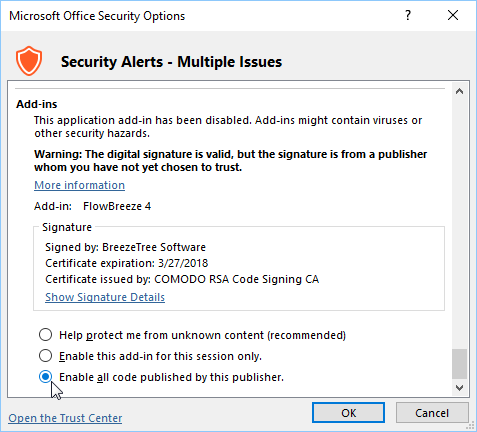
- The Microsoft Office Security Options windows will open, as shown below. Select the "Enable all code published by this publisher" option and click OK. This registers our digital certificate on your system.
License Registration Instructions
If you have already purchased a license, please follow these steps to register the software.
- Open Excel.
- Click on the FlowBreeze or Spreadspeed ribbon tab, depending which product you ordered.
- Click the "Help" drop down and select "Register" from the menu.
- On the registration screen, enter your license key and click OK.
(To prevent typos, it is recommended that you copy and paste the license key into the form.
Change Logs
Older Versions
Note: The setup files below require admin privileges on your system.
| Product | Default Setup | Admin Setup | Final Release | Supported Platforms |
|---|---|---|---|---|
| FlowBreeze 4 | FlowBreeze 4 Setup | FlowBreeze 4 Admin Setup | 4.8.1016 | Excel 2007 - 2016 / Windows 7 - 10 |
| FlowBreeze 3 | FlowBreeze 3 Setup | FlowBreeze 3 Admin Setup | 3.18.806 | Excel 2003 - 2010 / Windows XP - 10 |
| Spreadspeed 2 | Spreadspeed 2 Setup | Spreadspeed 2 Admin setup | 2.7.1016 | Excel 2007 - 2016 / Windows 7 - 10 |
| Spreadspeed | Spreadspeed 1 Setup | Spreadspeed 1 Admin setup | 1.5.708 | Excel 2007 - 2013 / Windows Vista - 10 |