•
Neil Davidson has an interesting post questioning the logic of trimming the fat in economic downturns. His isn’t the first blog post I’ve seen recently on the applicability of Lean to software development. As someone with an Industrial / Manufacturing Engineering background who now does programming, I bristle when I see production line concepts applied to software development, so I thought I would chime in on the topic.
There has been a push in recent years (mostly by consultants) to extend concepts from Lean and Six Sigma to service-based industries, but for the most part it doesn’t make sense. Production is deterministic. Work orders are scheduled, raw materials are pulled from stock and production workers have a standardized set of instructions for manufacturing a sub-component or finished good.
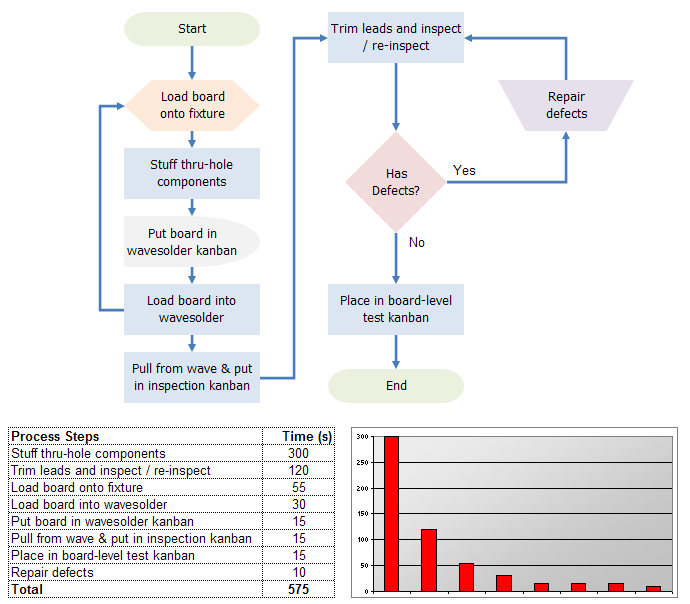
The typical work flow for a knowledge worker is not deterministic. You can’t pull a programmer’s brain from stock, run it through a 1-ton arbor press, and squeeze out code to fill an empty software kanban. And even in manufacturing there is a difference between high-volume, low-mix assembly and low-volume, high-mix assembly. Many of the techniques used in Lean, such as value stream mapping, don’t apply well to low-volume, high-mix production, let alone to non-manufacturing.
Another problem is the misuse of ‘Lean’, ‘Six Sigma’, and the combined ‘Lean Six Sigma’.
Lean is an offshoot of the Toyota Production System, created by Taiichi Ohno. He boiled it down to shortening the time between getting an order and getting cash by eliminating the seven common causes of waste in the process. This has been misinterpreted as cutting staff, as in “running a lean operation”. They’re not the same thing. The next time you see a CEO announcing that they are going to cut jobs as part of their Lean Six Sigma adoption, you can be pretty sure they have no clue what they are talking about.
I’ve seen other piss poor analogies of Lean applied to software as well. To give one example, some claim that rarely used features or commented out code are wastes of over-production. In manufacturing, when a new product is introduced, first it gets designed by an engineer. If it is a high-volume, low-mix environment, there’s typically a pre-production run to iron out the kinks. If it is a low-volume, high-mix environment, it often gets prototyped by one or more technicians, assembly workers, and engineers. If you have waste in a process, the prototyping stage is where you want to discover it - before production is ramped up - so it can be identified and eliminated. The problem with the software / Lean-waste analogy is that most code development is more like the prototyping stage than the manufacturing stage. You don’t write code once, then create the exact same code over and over again.
Six Sigma is a collection of tools for problem solving and quality improvement. Central to it’s theme is DMAIC - define, measure, analyze, improve, and control, and it relies heavily on statistical analysis. While it has been applied successfully to service based organizations where the procedures are very standardized, such as healthcare, it’s bit of a stretch to apply it to software development.
•
According to Google’s own data, Microsoft’s live.com has taken a commanding lead in the search engine war:


•
Free is good. Free that makes my product look better is great.
If you’re an Inno Setup user, take a peek at the free skins from Code Jock. The gallery of styles is here. They add a bit of polish and take only a few minutes to add it to your setup. It does add about 300 kb, so if you obsess about download size, it may not be for you.
I used the Office 2007 skin. Here’s the before:

Here’s the after:

I wonder if I can get Skinned for Vista Certified.
•
Version 2.2 of FlowBreeze Flowcharting add-in for Excel has been released. It has several new features and many minor usability improvements. Two of the features have come from customer requests - a Style Wizard, and Insert Branch tool.
The Style Wizard (shown below) lets you quickly apply formatting to an existing flowchart. You can make bulk edits to the font, style, or connector style. Or you can use the drop down selectors in the Symbol and Style columns of the grid to change individual shapes. (The Style Wizard is not available in FlowBreeze Basic Flowcharting Edition.)

The Insert Branch tool (shown below) provides a easy way to add tree / org chart structures to a flowchart. It allows you to add standard, left-hanging, and right hanging branches. Optionally, you can specify a label for the connector line of each branch.You can also set the shape type for each branch element and the spacing between branches.
The form is optimized for quick entry. When you hit the Enter key, the branch text and label will be added to the grid without having to tab over to the Add button. If the branch text and label fields are empty, hitting Enter again will close the form and generate the branches.

The bulk of the other changes were small improvements to other forms and a number of minor (but annoying) bug fixes.
•
Working Backwards
Lately I keep running into instances where different worlds coincide with a common theme. The theme I’m running into lately is flipping the funnel. Sometimes when you hit a stumbling block, it helps to flip the funnel and work the problem backwards.
For example, consider these three topics:
1. Improving e-commerce sales.
2. Reducing manufacturing cost and lead time.
3. Bringing a software product to market.
Focus on Checkout
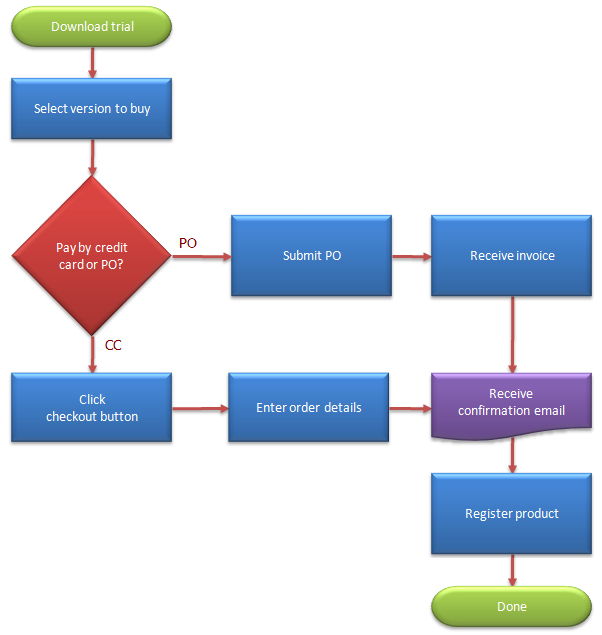
In the first case - selling products online - it’s a common mistake to work the process from the front end. The standard logic goes: get more traffic, which will result in more downloads, which will get customers to the purchase page, which will result in more sales.
When you start out, this makes sense. But once you have a steady level of traffic, driving more traffic is expensive. Then you must put more effort into optimizing the landing page to drive downloads. Then, you continually improve the product to drive visits to your checkout process. Then you get the improved revenues, right?
But if you look at it in reverse, you would start with your checkout process. According to Closed Loop Marketing, the average drop-out rate during the checkout process is nearly 60%. What if, instead of driving 10% more traffic to your site, you fine-tuned your checkout process to convert 10% more customers?
If you put advertising money into driving 10% more traffic, you will need to pay that every month. And not all the leads would be well qualified. But putting the effort toward improving your checkout process provides a bigger payoff. The visitors are pre-qualified (after all, they already were interested enough to click your buy button), plus the rewards will be felt long after the improvements are made.
Fishing in the Value Stream
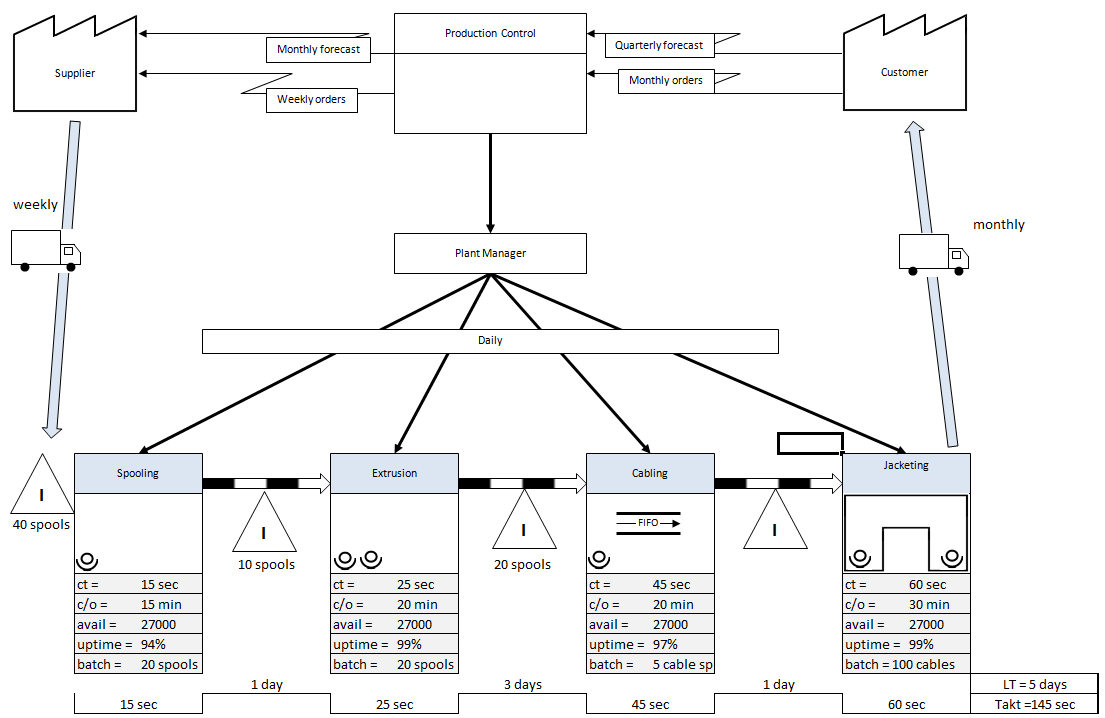
In the second case, I’ve been re-reading Learning to See, a book about Value Stream Mapping. Value Stream Mapping is a tool to analyze manufacturing processes (and recently service-based processes) in order to reduce cost and lead time. The process steps are laid out from start to finish, but the analysis works in reverse order. This is an over-simplified description, but essentially you start with customer demand and work your way back upstream to determine what you need from the preceding process and identify areas to reduce waste.
Write the Press Release First
The third case has to do with my own efforts to develop a new product. I wrote the spec, then started developing to it. It’s hard to describe, but there was something missing. It just felt like bits and pieces of related functionality without any glue.
Then I came across an old blog post by Werner Vogels, CTO of Amazon.com. In it, he lays out 4 steps to the product definition process:
Step 1 - Write the press release. He says, “Writing a press release up front clarifies how the world will see the product - not just how we think about it internally.”
Step 2 - Write the FAQ.
Step 3 - Define the customer experience.
Step 4 - Write the user manual.
Normally, I’m like many developers who market there own products. The press release is practically an afterthought. After coding and testing is done, you want to say, “Phew! That’s a relief. I’m done.” But you’re not. There’s a lot of work left to do, and having to write the press release afterward hits you when you’re running out of steam.
So I took Werner’s advice and did steps 1-3. (OK, so I skipped #4. So sue me.) Honestly, I wasn’t expecting it to have a dramatic impact, but surprisingly it did. I was able to refine what my marketing message would be. In doing so, I was able to refine what the user experience would be in a way that was much more logical and congealed.
I was less impressed with writing the FAQ, because those questions are always contrived until you actually get asked real questions by real customers. But overall, I would definitely recommend steps 1 and 3. It’s one of those things that people read about then forget, but if you actually try it, you’ll be glad you did.
You Might Have Guessed This Was Coming
Yes, I’m currently revamping the BreezeTree checkout process. Not only do I want to improve conversions, but I also need a system that works better for multiple product offerings because I’m working on the product that I pre-wrote the press release for. And, of course, it just happens to be a Value Stream Mapping edition of FlowBreeze.
•
Like a lot of people, I rely on voice mail a lot. Most of my sales are handled via online transactions with no assistance on my part. Most of my support issues are handled via email. But with a global customer base, I can’t always be there to answer the phone when a customer does call for sales or support issues.
The problem is, a lot of people think that leaving their phone number is a speed race. Strangely, the worst offenders are sales people. I’m guilty of it too. You leave a message in nice clear English, but when it comes to the phone number it, you spit it out as fast as you can: 503-201-ze-za-zo-ze. Huh?
The worst thing is, most people wait until the end of the message to leave the number. So if you miss it the first time, you need to re-listen to the entire message to catch it. I’ve had several messages like this in the last month, and no matter how many times I’ve replayed them, I still can’t make out the number.
I’m not trying to be rude, because I appreciate getting calls from customers. I really do want to call people back, and, like I said above, I’ve been guilty of this too. To resolve this, I propose a standard format for leaving voice mail messages:
“Hi, my name is {YOUR NAME}”
“I’m with {YOUR COMPANY / ORGANIZATION}” (Optional)
“My phone number is {YOUR NUMBER}.” (S-L-O-W-L-Y and clearly!)
“My email address is {YOUR EMAIL}” (optional but recommended)
{MESSAGE}
“Again that’s {YOUR NAME} at {YOUR NUMBER} or {YOUR EMAIL}”
Now, if you leave someone a message, they get the most important information - your name and number and email - at the top of the voice mail. If they miss it the first time, it’s repeated at the end. And if they still didn’t get it, they don’t need to repeat the whole message - just the first part.
•
Following MacWorld, Reg Developer started a rumor [1] that VBA would be going away from future versions of Microsoft Office for Windows. The speculation was based on Office 2008 for Mac dropping VBA (a big blunder by Microsoft, IMHO) and on Microsoft dropping their licensing program for 3rd parties to incorporate VBA into their applications.
Sometimes the internet is like a Petri dish for The Stupid Virus. Rumors grow and spread rapidly. This rumor spread wide enough that it even caused Microsoft to take notice. The Excel team at Microsoft posted a clarification [2] that VBA for the Windows based version of Office won’t be going away in the foreseeable future.
This is a good thing.
I’ve read speculation here and there about the future of VBA for a while now. Partly, this was due to the Mac 2008 VBA issue [3] and partly this was due to the huge push Microsoft is making for SharePoint services, relegating Office VBA development to the role of the red-headed stepchild. But no official word from Microsoft was issued until now. It took a widely read site like The Reg to make Microsoft stand up and take notice.
This started me thinking. What about all the other things developers wonder about?
I’d like to port FlowBreeze from VB6 to .NET, but there are still some stumbling blocks. The biggest hurdle is the lack of official support for Excel 2000. The next biggest hurdle is that COM add-ins run in the Excel process, and only one version of the .NET framework can be running in a single process space. If you develop using .NET 2.0 and the customer also uses an add-in based on .NET 1.1, then problems can occur. There are ways of dealing with these problems, but it would help if I had more information on which to base decisions.
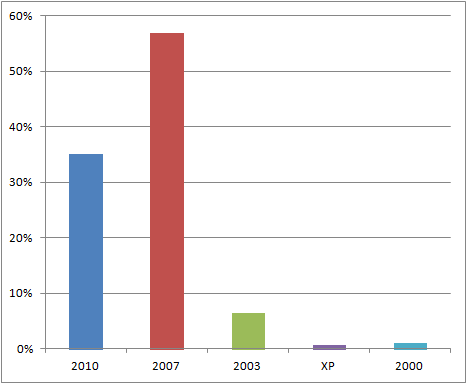
I, and a lot of other developers, would love to know the penetration stats for the various .NET frameworks. And what about the user stats for Office 2000, XP, 2003, and 2007? Solid market data on that would be great.
Maybe The Reg can help us out. I’m sure other people could think of more data Microsoft could share to aid the developer community. Could we get a few more rumors out there?
[1] http://www.regdeveloper.co.uk/2008/01/14/office_mac_08_vba/
(See the footnote that the article has been updated. In this case, ‘updated’ means ‘completely rewritten’.)
[2] http://blogs.msdn.com/excel/archive/2008/01/16/clarification-on-vba-support.aspx
[3] http://www.schwieb.com/blog/2006/08/08/saying-goodbye-to-visual-basic/
•
Do you ever feel like you’re not in control of your own workday? A lot of people do. They get to work and have little say over how to spend their time. Sure, they can prioritize projects and tasks, but overall the projects and tasks are set by external forces. They don’t get to pick their own projects and their own tasks.I used to have a job like that. The management wasn’t tyrannical, but there was so much work to be done. Plus we were so understaffed that there wasn’t much wiggle room in my schedule. I felt bogged down and unhappy.
That’s when I came up with The 10% Rule.
The 10% Rule is simple. To stay sane, allocate 10% of your time to secret pet projects. That 10% needs to come from your time - lunches, evenings, and weekends - not your employer’s. Most people have a ton of work to do, so skimming 10% of the top to work on pet projects is a bad idea for multiple reasons.
More importantly, doing little projects on the side gives you control. Control matters. Even if you’re the most diligent GTD or 7 Habits practitioner, most of your workday is spent doing tasks that are driven by outside forces. When you do secret pet projects, they are driven by you. You control a piece of your destiny. You get a greater sense of accomplishment and satisfaction.
The most rewarding projects of my career were secret projects that I had a hunch about. I did them in my own time, told no one about them, and only publicized them if they were successful. I didn’t knock it out of the park on all of them, but I had a fair number of successes. And most importantly, I was happier.
So if you’re feeling stuck in a rut, try The 10% Rule. You’ll feel so much better after you take back a little control over your work.
•
[This is a story about Bob. Bob is not his real name, but he is a real person. The events here were gleaned from intermittent conversations and pieced together as accurately as I could.]
I’d never heard the term “lifestyle business” until I met Bob. It was a few years ago, not long after he started a software company with the goal of being bought out. I told him about my company, and that’s when he introduced me to the term and explained the difference between a startup and a lifestyle business.
When I first met him, Bob was struggling to get off-the-shelf versions of his products to sell, so his company kept afloat by consulting - mainly providing customized implementations of their core product.
Finally they hit pay dirt when a golden trifecta of companies each bought multiple team licenses for his product. I won’t name the golden trifecta, but the three companies make chips, make computers, and sell the software that runs the computers, respectively. This got the attention of some national players, and Bob’s dream of selling his software company for a big payoff began to take shape.
Several suitors made preliminary offers, but one stood out. We’ll called it BigInvestCo. It had a track record of success and made the best offer. So he said thanks but no thanks to the other outfits and settled on BigInvestCo.
Then things slowly went south. It seems that these masters of enterprise at BigInvestCo were con men in $2000 suits. They suggested that the buyout price would be in the “set for life” range. After Bob had said no thanks to the other suitors, BigInvestCo lowered the buyout figure by half - which still would have been very good money. Following that, they did the due diligence and the final offer was to be put together. And that’s where things went bad.
The initial offer (which I assume was non-binding) was back in June, and BigInvestCo told Bob they hoped to close the deal by the end of the month. As part of the deal, he and his team would be given positions in a newly formed company, which would be a subsidiary of the BigInvestCo’s existing business. But the existing channel partners would be replaced by their in-house sales channel, so there was no need to keep nurturing them. Those ties were severed.
The owner of a startup is the rainmaker. Bob had hired a few salespeople, but none of them had the passion and understanding of the products to close deals like Bob did. But with Bob spending weeks away from his business while trying to negotiate the deal, the sales pipeline started to dry up.
Every time the deal seemed to be on the verge of closing, BigInvestCo used all kinds of delaying tactics and legal maneuvers designed to eat up time and legal expenses for Bob. With the sales pipeline sufficiently dry, a payroll to meet, and Bob’s finances getting tight, BigInvestCo came back with an offer at 10% of the June offer (i.e., 5% of the “set for life” figure).
I have to assume that hope overtook logic, because Bob plowed on, convinced he could still pull off a great deal for his company. Then one night, Bob’s out for dinner and drinks with BigInvestCo’s lawyer. After one too many, the lawyer let it slip that this is how these deals are done. They get the prospect all charged up, then as the deal progresses BigInvestCo does everything possible to bleed them out. When the seller is at the point of desperation, they make a lowball offer.
That was four months ago. I just found out the deal has gone tits up. I could tell it was painful, so I didn’t press for details. I don’t even know whether his company is still afloat.
At this point I suppose I could draw some conclusions or point out Bob’s missteps along the way. I assume readers can do that themselves. But I do think that starting a company solely to sell out is a long shot. You’re going up against people that do this for a living. They have deeper pockets, longer time lines, and less risk than you do. This is their game. They’re better at it than you.
Meanwhile, my quaint little lifestyle business looks better every month.
•
I’m always looking for new avenues to get the word out about FlowBreeze, so recently I ran an experiment using StumbleUpon’s advertising program. If you’re not familiar with StumbleUpon, basically it’s just a random site re-director. StumbleUpon users are served up random pages based on their preferences and demographics. If they like a page, they can give it a thumbs up, tag it for their personal bookmarks, or write a review. On the other hand, if they don’t like a page, they can give it a thumbs down. The more thumbs up a page gets, the more frequently it is served.
Occasionally they are served sponsored pages, which is how the advertising program works. They charge $0.05 per visit with a 100 visit per day minimum. When you sign up for StumbleUpon advertising, you can specify the following (see image below):
- Target URL.
- Category. (I tried both the Software and Shareware categories)
- # Visits/day (100 minimum at $0.05 / visit = $5/day minimum).
- Demographics (male/female/both, age, country, state, and city)
My Stats:
- Visits: ~500
- Downloads: 0
- Purchases: 0
My Reviews:
- 3 thumbs up.
- 5 thumbs down.
- Telling comment made by one reviewer: “Boo proprietary software.”
Why I Did It:
1. Because I love StumbleUpon. Of all the social bookmarking sites, it’s the only one I truly use and dig (pun intended).
2. I have actually purchased items from pages I’ve Stumbled.
3. BreezeTree.com has been Stumbled in the past and vistors have converted.
Key Downsides:
- Targetting is too broad.
- Audience probably looking for freebies.
- Targetting is limited to one country or all countries. There is no subset for a single campaign.
- Ads start running at midnight, so targetting global visitors will eat up your visits before the U.S. wakes up for breakfast.
Who I Would Recommend It For:
- People with a lot of money to throw around.
- Sites trying to build a buzz.
- Sites that offer free or cool content.
- Site hoping to gain gain backlinks.
The Bottom Line:
My $25 would have been better spent lighting a $5 cigar with a $20 bill (or better yet, a $20 cigar with a $5 bill).