Using Keywords and Prefixes
Keywords and Prefixes are central to the power of FlowBreeze. In a nutshell, these are the two ways that FlowBreeze automatically generates flowchart symbols and other shapes from your text. Here's how each works.
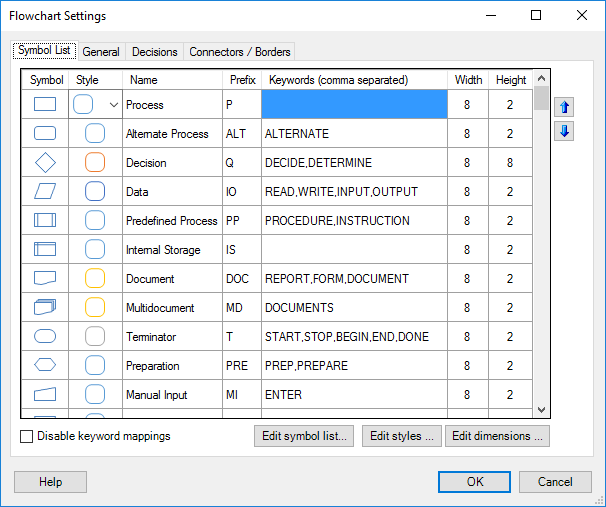
Picture 1 - Symbol List
(from the Settings window)
Keywords
- Definition: A "keyword" is a word that you assign to a symbol. Whenever you use a keyword in an entry, FlowBreeze will spot the keyword and generate the associated symbol.
- Usage: You define keywords for a symbol in the Settings window, as shown in Picture 1 above.
- Example: Picture 1 shows that the word "REPORT" is set as a keyword for the Document symbol. If you are in flowcharting mode and type "Print TPS report", FlowBreeze will detect the keyword "report" (keywords are not case sensitive) and generate a Document symbol containing the text entered.
- Exact match: Place an equal sign (=) in front of a keyword to associate it to a symbol only when the flowchart text consists solely of the keyword.
- Priority: Again referring Picture 1, there are two buttons with up / down arrows next to the active symbols list. These let you set the order in which Keywords are evaluated. If an entry contains keywords associated with two different shapes, the shape with the higher priority on the list will be generated.
- Default Symbol: If an entry contains no keywords (or prefixes), then a process symbol (rectangle) is generated by default.
Note: Keywords must be whole words. Therefore the plural form of a keyword would not be recognized unless it was explicitly added to the keyword list.
Prefixes
- Definition: A "prefix" is abbreviation that you assign to a symbol. Whenever you put a prefix at the beginning of an entry, followed by use a prefix delimiter, FlowBreeze will spot the prefix and generate the associated symbol.
- Usage: You define the prefix for a symbol in the Settings window, as shown in Picture 1 above.
- Example: Picture 1 shows that "IO" is the prefix for the Data symbol. You can force a Data symbol to be generated by using the prefix "io" even if none of the symbol's text will contain a keyword. So if you type "io:get buffer file", FlowBreeze will detect the prefix and generate a data symbol containing the words "Get buffer file". Prefixes are not case sensitive.
- Prefix Delimiter: Referring to the example above, the colon (":") in "io:get buffer file" is the prefix delimiter. In order for FlowBreeze to recognize that a prefix is being used, the prefix must be separated from the entry with a delimiter. You can set a different delimiter on the General tab of the Settings window.
- Reserved Prefixes: No two symbols can have the same prefix, and there are several prefixes reserved by FlowBreeze for special use. These include: BR, FL, GFX, LBL, PIC, SHP, and TB.
Note: You can also use prefixes to create empty symbols with no text in them.
Evaluation Priority
If an entry contains both a prefix and a keyword, the prefix will have precedence over the keyword. The evaluation priority to determine a shape type is as follows:
1. Prefixes
2. Special rules for decisions and connector nodes.
3. Keywords